Zrythm v2.0.0-alpha.5 Released
Zrythm v2.0.0-alpha.5 has been released! The highlights are native LV2 plugin hosting, a new clipboard with copy/cut/paste/duplicate for objects, tracks and plugins, a notification center, and a refreshed UI.
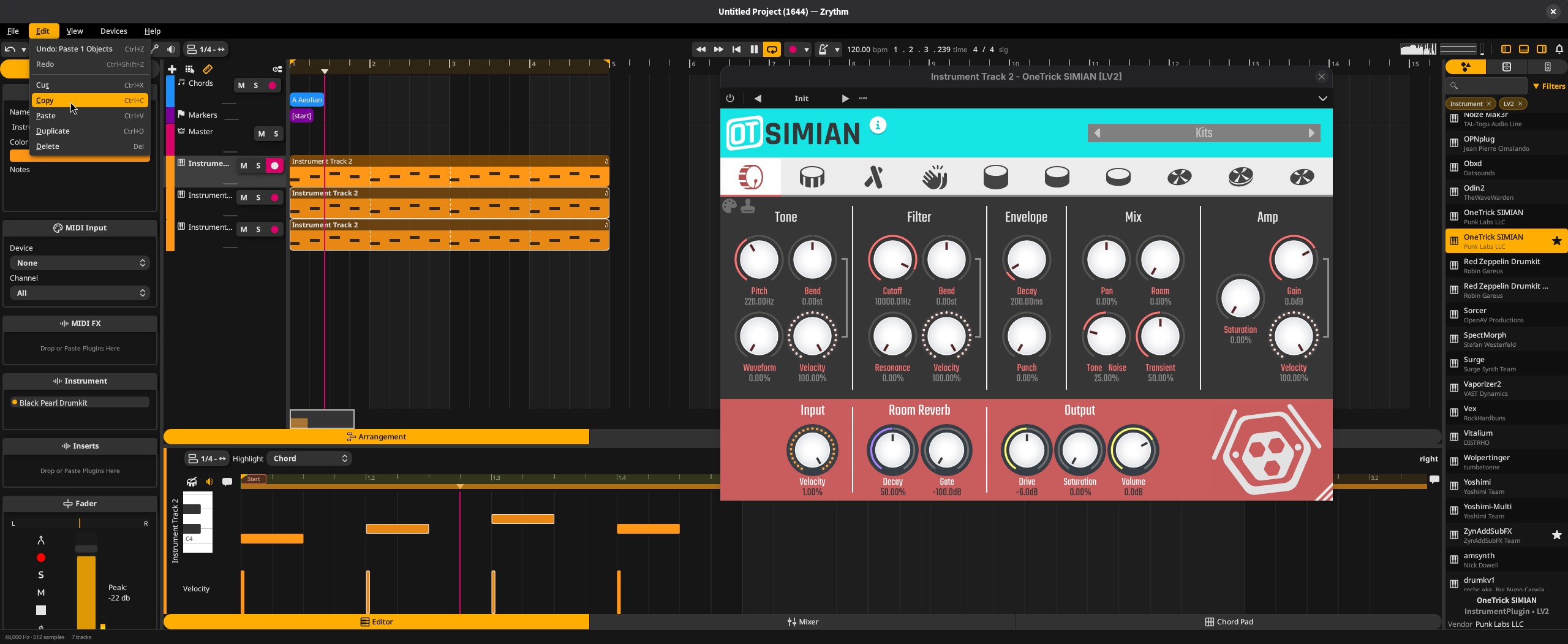
This is an alpha release intended for testing and feedback. Many features are still missing or incomplete.
What’s new
Native LV2 hosting:
- LV2 plugins are now hosted natively through lilv, replacing the JUCE wrapper: scanning reads bundle metadata only, so plugin binaries are never loaded during discovery
- Native LV2 plugin UIs open in real host windows on GNU/Linux (embedded under Wayland via XWayland) and honor each UI’s own size and resize requests
- pset presets can be listed and applied, plugins that declare a default state load it on instantiation, and numeric
patch:writableparameters are exposed as automatable - State files created by plugins (through
state:makePath) are embedded in the state blob as a zip archive, so a save is self-contained and can be restored by any instance - Presets for CLAP plugins are discovered and loaded through each plugin’s own preset-discovery providers
Clipboard:
- Undoable copy, cut, paste and duplicate for arranger objects, tracks and plugins (#5172): keyboard shortcuts, context menus and the Delete action all follow the focused view, pasted tracks keep their folder nesting and output routing, and editor arrangers paste into the edited clip at the playhead
- The clipboard syncs with the OS clipboard, so selections can be pasted across projects and instances
- Lanes can be deleted from the lane context menu, with undo support; laned tracks always keep a trailing empty lane for placing new clips
Notifications & design:
- A notification center replaces modal alerts (#5324): toasts coalesce repeated occurrences and can carry an optional action button, a bell icon shows the number of unacknowledged warnings and errors, and a history popover lists past notifications with relative timestamps
- The UI has been restyled around a new design system: dialogs are native windows whose emphasized default button is triggered by Return from anywhere, menus and combo popups share consistent spacing and typography with animated color transitions, and recording and error states use distinct shades of red
- A new status bar shows the audio engine’s sample rate, buffer size and track count
Workflow & polish:
- Plugins can be favorited in the browser; favorites persist, get their own filter, and a new plugin info dialog shows each plugin’s metadata. Browser rows display the vendor as a subtitle and offer show-in-file-manager and import actions
- The Greeter’s recent projects list now shows two-line entries with actions to reveal the project in the file manager or remove it from the list
- A new third-party licenses page in the About dialog lists every shipped component with its copyright and license texts
- Updated translations (Swedish, Czech, Spanish, French, Russian, Ukrainian and more)
Notable fixes:
- Edits made in plugin UIs (VST3, CLAP) now count as user edits: they mark the selected preset as modified and collapse into a single undo step instead of flooding the undo history
- VST3 parameters reported by the plugin during processing now reach the host’s parameters, separate edit controllers are notified of applied values, and dual-component plugins no longer appear twice in scans
- Crashes in pango-based plugin UIs (e.g. avldrums) caused by bundled copies of harfbuzz/freetype shadowing the system libraries
- Scans of bundles containing no plugins (e.g. preset-only bundles) timing out and blacklisting the scanned path
- The Greeter re-showing the last alert when a project closes, and its page stack growing on repeated load failures (#5324)
- The audio engine no longer accepts deactivation during an offline render, which previously left the render thread processing without a device callback
- Periodic plugin parameter flushes no longer slow down over a session as the undo history accumulates removed plugins
The old JUCE-based LV2 hosting has been removed along with the vendored LV2 headers, superseded by the native implementation.
Downloads
Source tarballs with GPG signatures are available at zrythm.org/releases.
Prebuilt installers are available on the GitHub release page, including Windows on ARM (ARM64EC) builds, available thanks to Microsoft providing us with a build device.
Building from source
See the build instructions in the README.
Reporting issues
Please report bugs on GitLab.
Thanks
The project is currently funded through NGI0 Commons Fund, a fund established by NLnet with financial support from the European Commission’s Next Generation Internet program.
If you’d like to support Zrythm’s development, consider purchasing a plan from zrythm.org or donating.